


Have you ever wondered about an assistant that solves any critical problem or query with just one click? Six years back, there was no concept of such a companion, or it may be impossible. Luckily, this era gained the potential to amaze the world with innovative technologies like CHATGPT. Whether you belong to content creation, programming, customer support, or brainstorming, all you have to do is write a thoughtful prompt. However, the main twist of using this AI-powered assistant is using the right prompts for a smarter and more precise response. Let’s master CHATGPT to boost our growth in 2025. This guide covers 14 advanced techniques to help you maximize ChatGPT in 2025, with real-world examples and insights.
Understand ChatGPT’s Capabilities and Limitations
Before exploring ChatGPT’s more advanced features, it’s essential to understand its limitations. Let’s explore what it can do and what it cannot.
- Key Strengths: Fast text generation, multi-language support, creating engaging content, and helping with brainstorming.
- Limitations: It does not have real-time data access, may provide outdated information, and sometimes makes mistakes. It also lacks personal experiences and emotions in its responses.
- Pro Tip: Always verify critical information with trusted sources and continuously refine prompts for better results.
Master the Art of Prompt Engineering
The quality and accuracy of ChatGPT’s response depend on how well you write or create your prompts. Using precise, well-structured, and detailed prompts leads to better and more concise results.
Best Practices for Effective Prompts:
- Be specific: Don’t overwrite. It can lead to unclear results. Try to be exact with your topic and task.
- Use role-based prompts: Try assigning a role and asking CHATGPT to act like it. This trick unlocks a better and more specific response.
- Provide context: It simply means a complete query and some background knowledge. An unclear prompt leads to a false response, filtering the reaction over time. You can train your AI assistant as you demand.
- Iterate and refine: Start with a simple prompt, then filter it based on responses.
Examples:
- The prompt “Tell me about SEO” is incorrect. Try “Explain the top 5 SEO trends for 2025.”
- “Act like a marketing expert. Suggest a campaign strategy for a new e-commerce store that will boost sales and increase organic traffic.”
- “Write a 500-word blog on AI in healthcare, using statistics and real-world examples.”
Use ChatGPT for Content Creation & Optimization
Master ChatGPT to boost content creation efficiency significantly.
How to Use It for Better Content:
- Generate blog post outlines: Ask ChatGPT to create a structured outline before writing.
- Improve readability: Use AI to simplify complex sentences and improve tone.
- Summarize long texts: Quickly get key insights from lengthy articles or documents.
- Create engaging social media posts: AI-generated captions, tweets, and LinkedIn posts can save time.
Pro Tip: Combine ChatGPT’s suggestions with human creativity for more authentic, engaging, and well-structured content.
Leverage ChatGPT for Data Analysis & Research
While ChatGPT isn’t a direct replacement for tools like Excel or Tableau, it can help with:
- Data interpretation: Explaining complex datasets in simple terms.
- Market research: Summarizing industry reports and trends.
- Statistical insights: Providing formula-based solutions (e.g., regression analysis explanation).
1- 2023 Usage Insights:
- 72% of marketers using AI tools like ChatGPT reported a 30%+ increase in content production efficiency.
- Over 50% of professionals use ChatGPT for research and summarization tasks.
Experiment with AI-Powered Brainstorming
ChatGPT can act as a creative business or idea partner when you have any queries, but before doing so, you need to follow this guide to master CHATPT.
Best Uses for AI Brainstorming:
- Business ideas & startup concepts
- Marketing campaign strategies
- Book titles and content angles
- Video scripts and YouTube content ideas
Explore ChatGPT Plugins & Third-Party Integrations
- Zapier: Automate repetitive tasks (e.g., AI-generated email responses).
- Google Docs: Draft and edit documents collaboratively.
- Canva AI: Generate visual content alongside text-based outputs.
Utilize ChatGPT for Coding & Debugging
Developers increasingly use ChatGPT to write, review, and debug code.
Best Practices:
- Ask for explanations. Example: “Explain this JavaScript function step by step.”
- Debug code snippets: Paste error messages and request solutions.
- Optimize existing code: Get suggestions for better performance.
Compare ChatGPT with Other AI Assistants
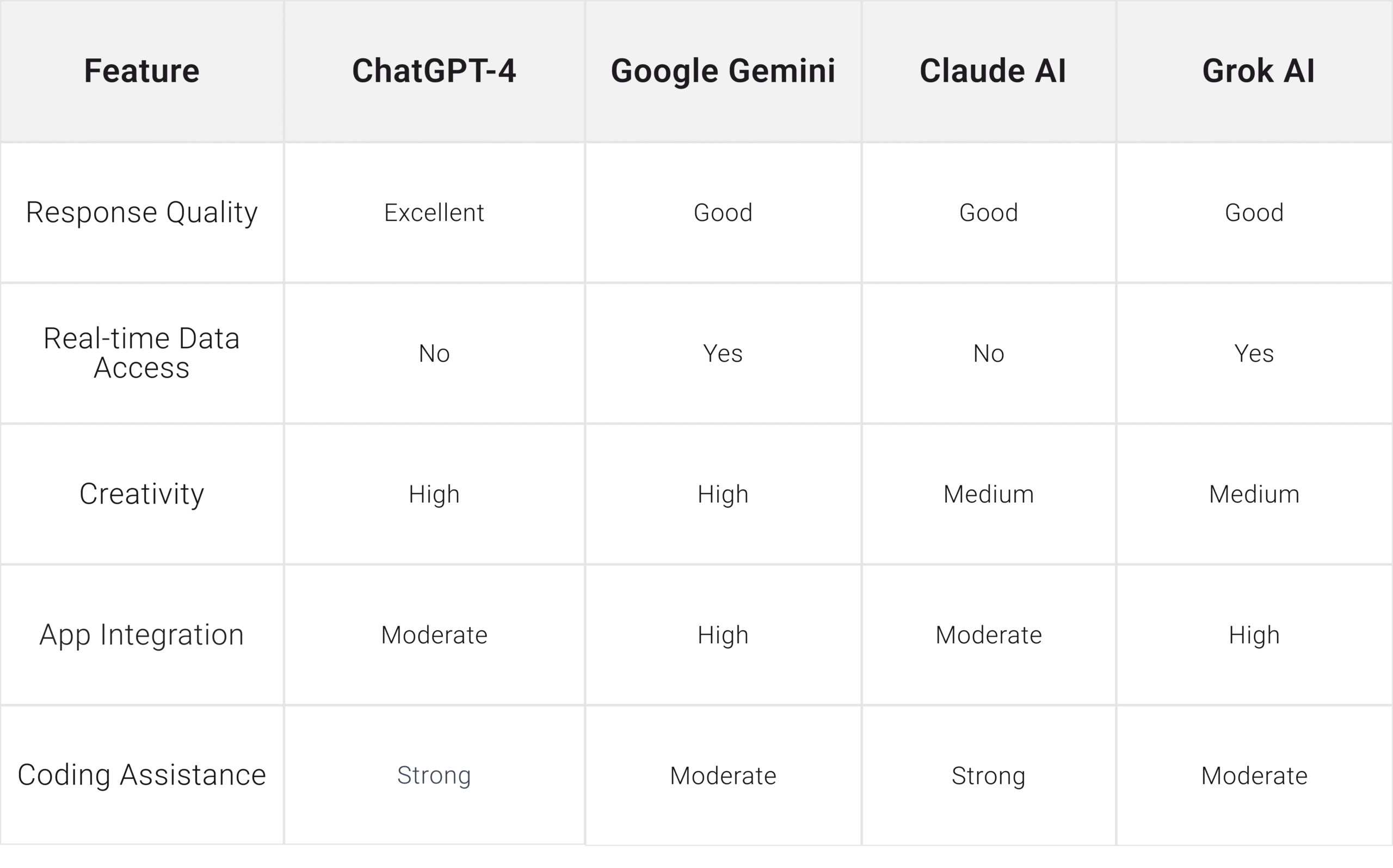
For more details, read also Grok vs. ChatGPT: Comparing AI Assistants
Improve SEO Optimization
Essential SEO Strategies:
- Use relevant keywords (e.g., ChatGPT tips, best AI prompts).
- Optimize headings & subheadings with keyword variations.
- Write engaging meta descriptions & title tags under 160 characters.
- Include FAQs to improve search rankings and answer common queries.
10- Common Prompt Mistakes People Make
Here are some common mistakes that users make while using CHATGPT:
- Vague Requests: Starting with a generic question, “Tell me about marketing,“ the best practice is to ask, “What are the top three digital marketing strategies for e-commerce in 2025?”
- Lack of Context: Saying “Write an article on AI” is too broad. A better prompt would be “Write a 500-word blog on AI’s impact on healthcare with real-world examples.”
- Overly Long or Confusing Prompts: A long, unfocused request may lead to an unstructured response. Keep your prompts clear and to the point.
- Ignoring Iteration: Expecting perfect results in one attempt is unrealistic. Refine your prompts based on previous responses.
- Forgetting to Define Format: If you need a list, outline, or paragraph, mention it. Example: “Provide a bullet-point summary of the latest cybersecurity threats.”
To get more details, read also Flow GPT: AI That Fosters Imagination and Productivity
11- Sample Well-Structured Prompts for Different Fields
1. Content Writing
Prompt: “Write a 500-word blog on AI in healthcare, using statistics and real-world examples. Keep the tone natural and engaging, and avoid the use of complex sentences.”
2. Digital Marketing
Prompt: “Act like a marketing expert. Now, suggest a campaign strategy for a new e-commerce store that will boost sales and bring organic traffic.”
3. Coding & Development
Prompt: “Explain how to optimize a ReactJS website for performance. Include best practices and common mistakes.”
4. Data Analysis
Prompt: “Analyze how inflation affects consumer spending. In less than 300 words, highlight the most important findings from recent publications. “
5. Customer Support Automation
Prompt: “Create a chatbot script to manage purchase tracking and refund inquiries for an online store. Be realistic”
6. Business & Entrepreneurship
Prompt: “Explore five trending and high-performing business ideas for 2025. Include target audience, potential challenges, and estimated startup costs.”
8. Resume & Job Applications
Prompt: “Write a professional cover letter for a software engineering position at Google. Highlight experience in Python and cloud computing.”
9. Personal Productivity
Prompt: “Suggest a daily routine for a remote worker to stay productive. Include time for focused work, breaks, and exercise.”
12. Frequently Asked Questions
1- How can ChatGPT be trained to respond human-like?
Modify the prompt’s structure by starting with a straightforward question and filtering it according to answers.
2- What CHATGPT prompts leads to better results
Prompts that provide detailed instructions, some context, step-by-step explanations of the work, and real-world examples continuously improve results. This guide hold a lof of strategies to master CHATGPT.
3- What differentiates ChatGPT from Grok and Claude, two other AI chatbots?
Grok and Claude have unique contextual understanding and long-form content creation skills, while ChatGPT is excellent in conversational AI.
4- Can professional duties like research and coding be done using ChatGPT?
Yes! It facilitates content generation, coding, debugging, and research paper summarization.
5- Which is the most potent ChatGPT hidden feature?
Creative tasks, such as writing emotions and creative brainstorming, can be accurately completed by it.
To explore more details, read also Gpt66x: Exploring Its Impact On Business And Technology
6- How can I integrate ChatGPT with other apps to boost its performance?
Combine it with Google Docs, Notion, Zapier, and API interfaces for smooth process automation.
7- Does ChatGPT provide multilingual support?
Although it supports several languages, accuracy varies according to complexity and context.
8- What are the limitations of ChatGPT?
In addition to lacking real-time internet access (unless linked to plugins or APIs), it could produce inaccurate or outdated data.
Future of ChatGPT: What’s Next?
The future of GPT models looks exceptionally bright as AI models continuously improve, resulting in significant improvements in accuracy and real-time data access. Leading AI companies like OpenAI are trying to make AI models more ethical, practical, and human-like. Here’s what we should expect shortly:
- Enhanced Reasoning & Context Awareness: Future versions of GPT will better understand long-form conversations, remember context over extended interactions, and improve logical reasoning.
- Real-Time Internet Access & Live Data Integration: Current models have limited real-time browsing capabilities. However, upcoming iterations will integrate real-time data feeds for the most up-to-date information.
- Stronger Personalization & Memory: Future AI will adapt better to users’ preferences, providing a tailored experience based on past interactions.
- Lower Computing Costs: Thanks to advances in the model, GPT will be able to produce answers more quickly while using less energy and computing power.
Protip: Master Chatgpt with this guide and use it strategically and precisely to get more precise and fast.
14. Conclusion
In 2024, mastering ChatGPT means more than simply using it: refining your strategy to receive more thoughtful, accurate, and quicker responses. From customer service to assisting in advanced research, education, healthcare, and even IT, these AI-powered assistants have the potential to dominate any field.
What Comes Next? Start implementing these strategies into practice right now, and try several methods to determine which suits you best.